Run every client's cold email operation from one place.
Coldops brings Instantly, Smartlead, EmailBison and Apollo into one command center. See which clients need attention, catch deliverability issues before they cost replies, generate weekly client updates.
14 days of everything free · no card required · cancel anytime
Paste one API key and a 100-mailbox workspace is read, graded and checked in under a minute.
Pricing shape
Every other tool meters the thing that grows.
Deliverability tools bill per mailbox or per sending domain. Win a client, add inboxes, and the bill climbs with them — the software gets more expensive for the same reason your agency gets better. Coldops prices in flat bands of mailboxes watched, so growing inside your band costs nothing.
- Rate on their own pricing page
- $3.00 – $3.00 / mailbox
- Mailboxes in the book
- 700
Grow the book to 1,100 mailboxes and every one of these numbers grows with it. That is what a linear meter does.
- Rate
- Flat to 1,500 mailboxes
- Mailboxes in the book
- 700
Grow the book to 1,100 mailboxes and it is still $199. The band covers up to 1,500 mailboxes watched, across as many client workspaces as you like.
Rates read on each vendor's own pricing page on 22 August 2026. These are not like-for-like products and the point is not that they're expensive — every one of them does real work Coldops does not. See who, what they charge and what it buys
The problem
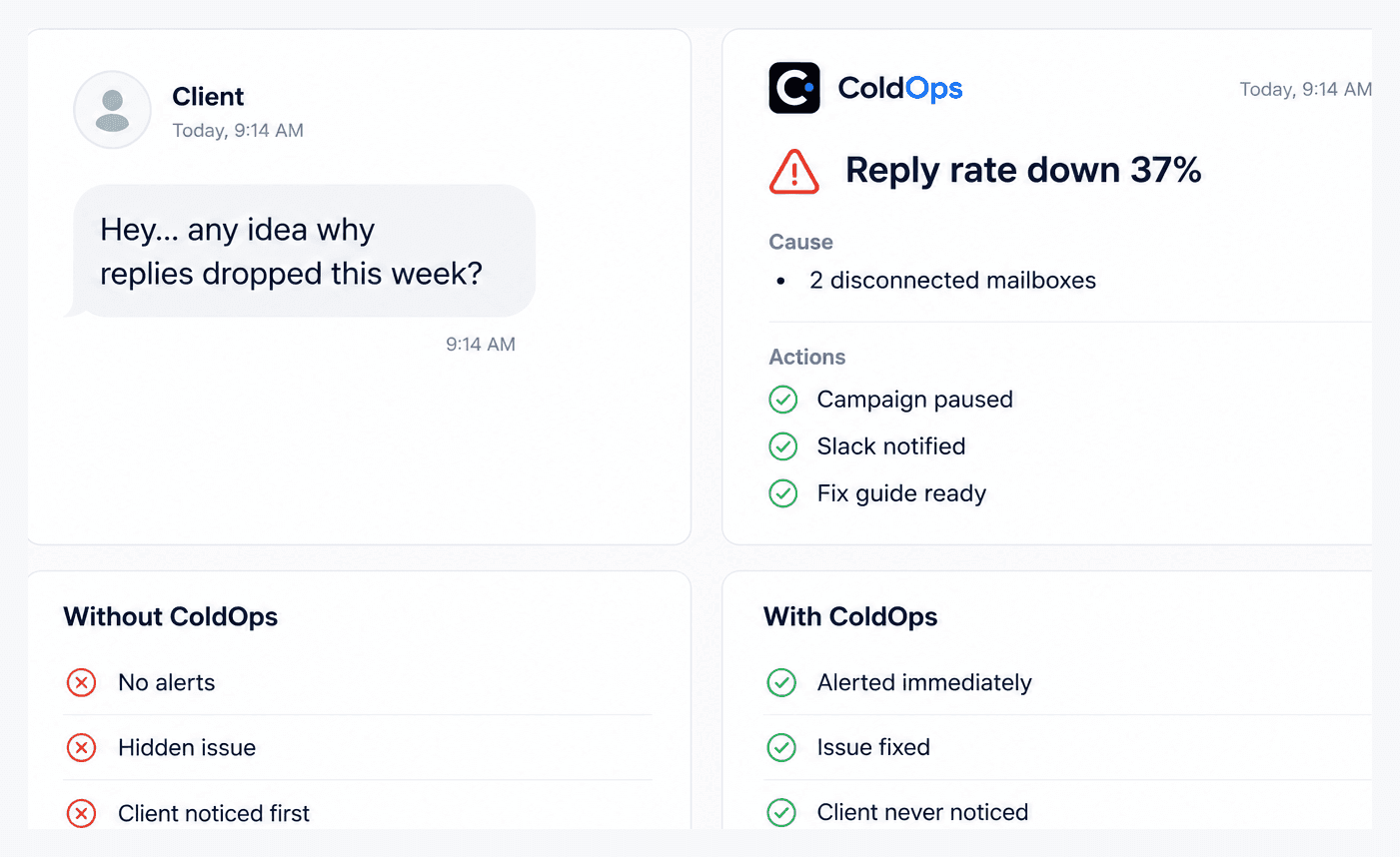
The first alert shouldn't come from your client.
You shouldn't need to become every client's deliverability expert. Coldops watches them all for you.
Every client means another dashboard to open before breakfast.
Deliverability problems stay invisible until results suffer.
Clients expect you to catch problems before they do.
The fix
Spot issues before your clients do.
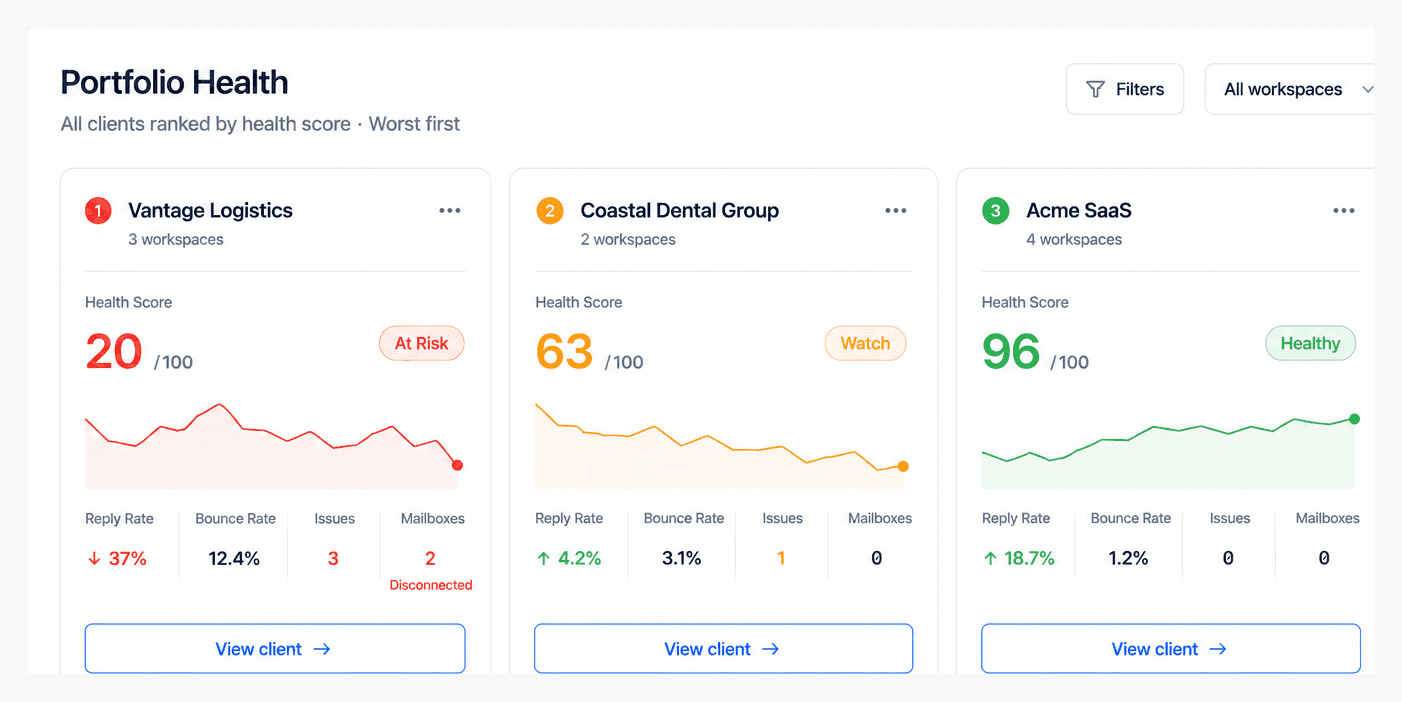
Monitor every client in one place
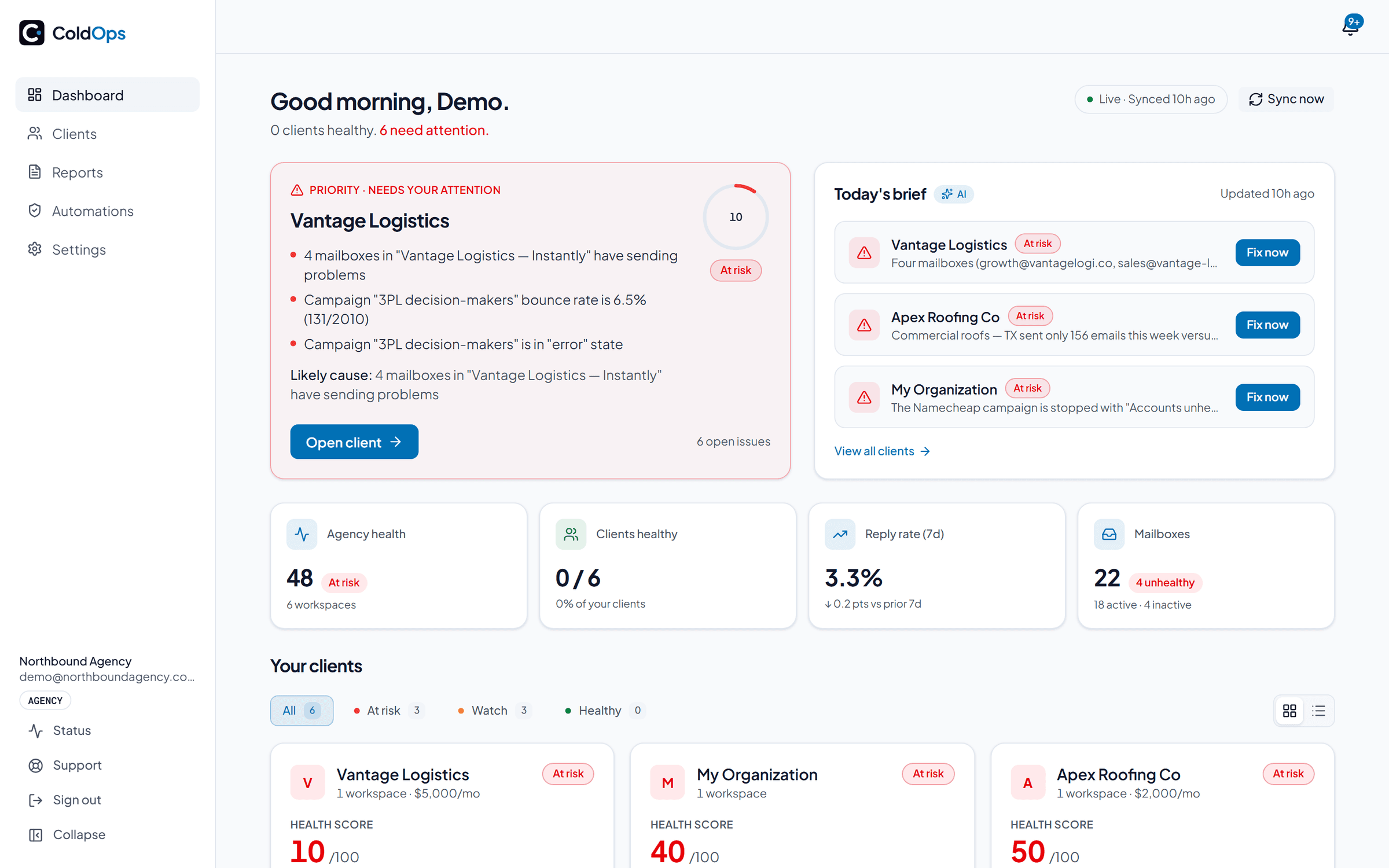
Coldops brings every client, campaign and mailbox into one dashboard, so you always know what needs attention first.
One dashboard. Every client.
Prevent churn
Catch issues before your clients do. Every alert explains what happened, why it happened and how to fix it before results suffer.
Your sending platform tells you when a reply arrives. Nothing tells you when replies stop. Coldops compares each campaign's last 7 days of reply rate against its own previous four weeks and alerts when it falls by half, because going quiet is usually the first visible sign of a deliverability problem.
One saved retainer pays for Coldops many times over.
Automate client reporting
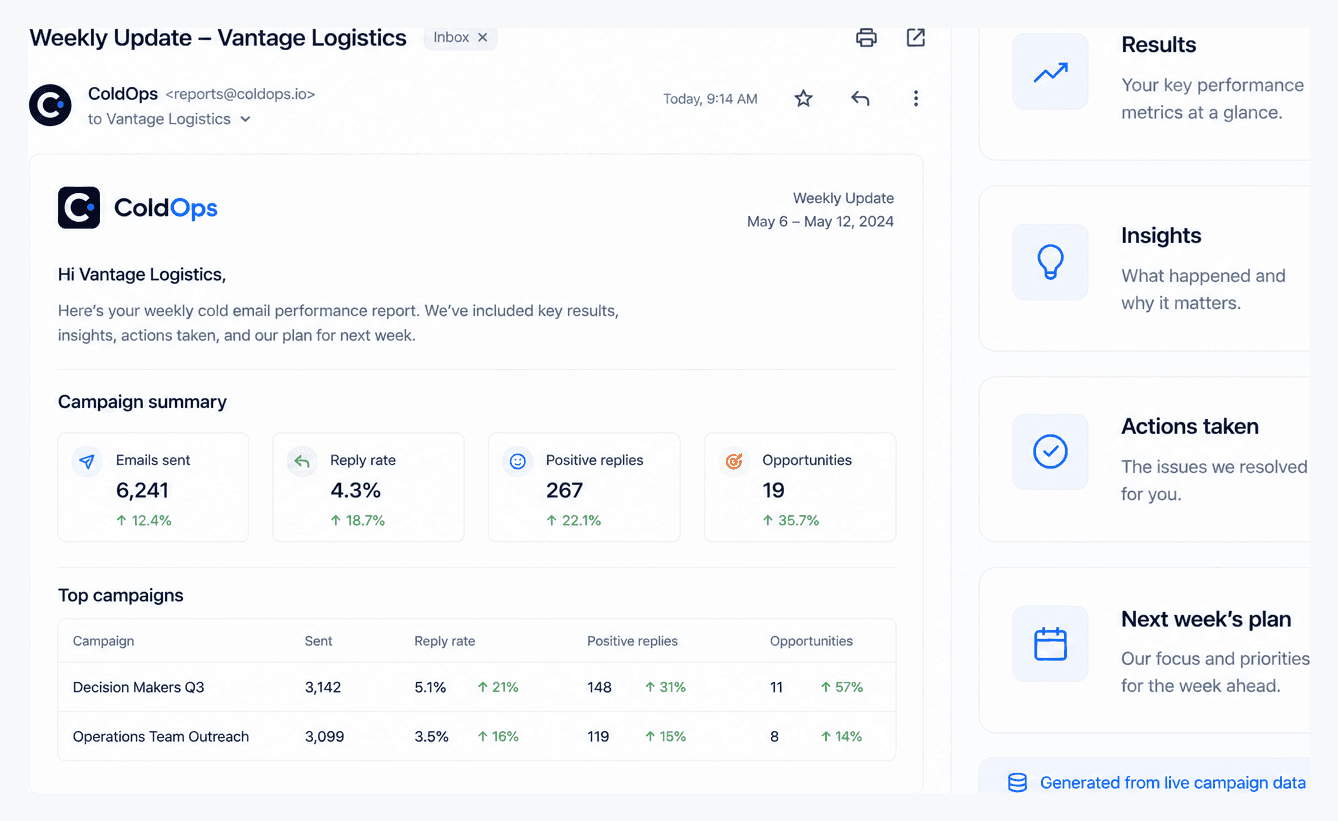
Stop writing the same weekly updates over and over. Coldops drafts them for you from live campaign data.
A client running several workspaces gets one combined report, not one per workspace — rolled up, recipients deduped, sent on your schedule from your own domain.
45 min → 2 min per client report.
Plus everything an agency needs
What you actually get
Everything Coldops watches.
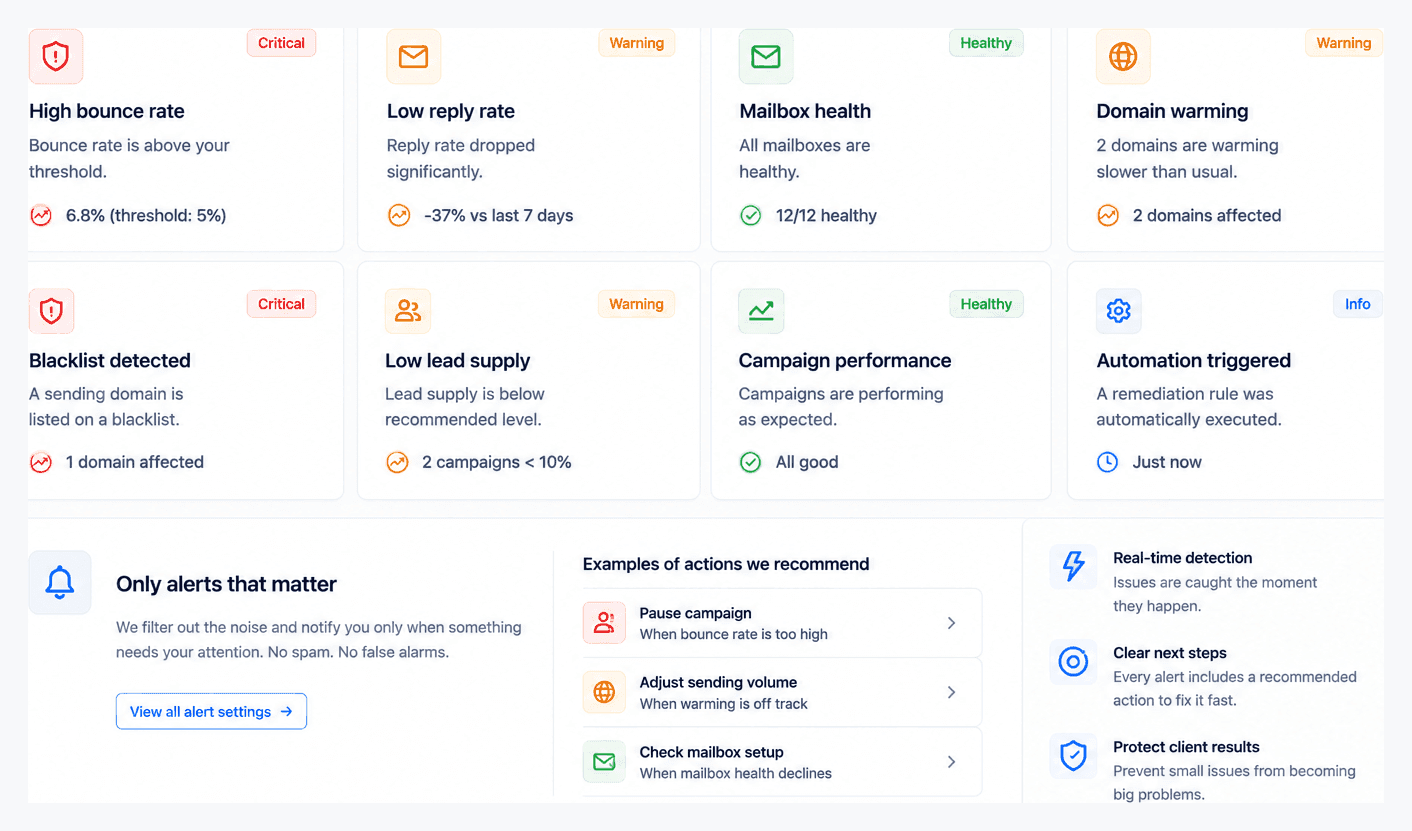
Monitoring is always on: Coldops watches every client across every platform and warns you before deliverability breaks. 35 checks across your whole outbound stack, re-run as often as every hour.
12 connected · 0 disconnected
Warmup strong, campaigns bouncing
5 monitored · 0 burning
1 domain missing DMARC
11 of 10 lookups — PermError
No rua — reports going nowhere
No unplanned record changes
2 domains under 30 days
Earliest renewal in 214 days
12 domains share one registration day
Burning faster than replacements warm
0 listings detected
All resolving, none listed
Largest drop −37%
1.3% average
1 campaign stalled mid-sequence
Warmup mail landing in inbox
Google senders → Microsoft leads
1 campaign erroring
2 campaigns under 10% remaining
Every workspace reporting in
6 automation rules active on Instantly
Every sync checks your entire outbound operation, surfacing issues before they become client problems. Each check runs where your platform reports the data behind it: warmup health and spam placement need per-mailbox warmup stats. Instantly reports those; Apollo has no warmup product at all; on Smartlead and EmailBison they run only where your platform returns them.
From a customer
“Coldops watches our 2,000+ mailboxes and showed us exactly which ones to cut. We used to do that manually.”
Automations
Fix issues before they become client problems.
Coldops identifies the root cause, recommends the next steps and — on Instantly and Smartlead — can carry out the fix for you. On EmailBison it attempts the pause and logs exactly what your self-hosted build answered. Apollo has no write API, so those workspaces get the diagnosis and the alert, not the action.
Less time troubleshooting. More time growing.
Detects issues
Every sync checks for the problems you care about, including bounce spikes, disconnected mailboxes, deliverability issues and reply-rate drops.
Acts on your rules
Choose which issues should trigger an alert and which Coldops should handle automatically. Set rules globally or override them for individual clients. Pausing a campaign is confirmed on Instantly and Smartlead and attempted on EmailBison; pausing a single mailbox and cutting a campaign's daily limit are Instantly only.
Safe by design
Every action is logged and starts in dry-run mode, so you see exactly what Coldops would do before you enable anything. You unpause in your sending platform.
Off by default · starts in dry-run mode · every action dry-run first · full audit trail · per-sync safety limits prevent cascading actions.
The pause is confirmed on Instantly and Smartlead and attempted on EmailBison. Apollo has no write API, so the same rule notifies you instead.
Automated reporting
Client updates, already written.
Coldops writes weekly updates that keep your clients informed and build trust — drafted from live campaign data, ready to review in minutes.
Provider alignment
The deliverability leak no other tool catches.
Google trusts Google, Microsoft trusts Microsoft. When a campaign's leads sit on one provider but you send from the other, inbox rates quietly sink. Coldops flags the mismatch before it costs you replies.
“47% of this campaign's leads are Microsoft-hosted, but you're sending only from Google mailboxes — ~2,600 leads exposed to cross-ecosystem filtering.”
Live in 1 minute.
Connect workspaces
Add one Instantly, Smartlead, EmailBison or Apollo API key per client (EmailBison is self-hosted, so it also takes your instance URL). We validate and securely encrypt each key.
Sync your data
Coldops automatically imports campaigns, daily metrics and mailbox health. Your dashboard is ready in minutes.
Stay ahead
Connect Slack or email alerts. From then on, Coldops warns you before deliverability issues become client problems.
Pricing
One plan. Priced by mailboxes watched.
Move the slider to the number of mailboxes Coldops should watch. That's your price: one flat number, never per seat or per client. Every account starts with the full product free for 14 days, no card required — pick the band your book fits when the trial ends.
Backed by a 30-day money-back guarantee. Pick your band (yearly saves two months), use it a full month and if it isn't saving you time and keeping clients, email us for a full refund.
Every band includes unlimited campaigns, direct Instantly, Smartlead, EmailBison and Apollo API integrations, encrypted keys and free product updates. There are no per-seat fees. Your price only changes when your book grows into the next band.
FAQ
Questions, answered.
What is Coldops?+
Coldops is a cold email monitoring and client reporting platform for lead generation agencies. It connects to Instantly, Smartlead, EmailBison and Apollo, watches every client's campaigns, mailboxes and sending domains for deliverability problems, alerts you before results suffer and drafts the weekly client report automatically — all from one dashboard.
What does Coldops do?+
Four jobs. Monitoring: it checks every client's reply rates, bounce rates, blacklists, SPF/DKIM/DMARC and DNS changes on every sync. Alerts: when something breaks you get one email or Slack notification explaining what happened, why and how to fix it. Automations: it can pause a failing campaign automatically, reversibly, on your rules — confirmed on Instantly and Smartlead, and attempted on EmailBison, which is self-hosted, so Coldops can't confirm the endpoint until it runs on your instance. Apollo has no write API, so those workspaces alert only. Reporting: it drafts the weekly client update from live campaign data so you review instead of write.
What does Coldops catch that my sending platform doesn't?+
Sending platforms handle arriving replies well: they pool every mailbox into one inbox, notify you and tag what came in. The gap is replies that stop. An arriving reply is an event, so it's easy to notify on; a reply rate quietly sliding toward zero is an absence and nothing fires on an absence. Coldops watches for the absence. It compares each campaign's reply rate over the last 7 days against that same campaign's previous four weeks and alerts when it falls below half of that baseline (adjustable in Settings) once the campaign has sent enough for the comparison to mean anything. A reply rate falling against its own history is usually the first visible symptom of a deliverability problem.
How does Coldops connect to Instantly, Smartlead, EmailBison and Apollo?+
You paste an API key per client workspace (in Instantly: Settings -> Integrations; Smartlead works the same way, and Apollo takes a master key from Settings -> Integrations -> API). EmailBison is self-hosted, so it takes your instance URL alongside the key. Keys are validated on entry and encrypted with AES-256-GCM at rest. Coldops reads campaign analytics and account health and never sends emails from your accounts. The one thing it can write is an automation, which is off by default, opt-in per issue type and limited to platforms with a write API: campaign pausing on Instantly and Smartlead, plus EmailBison, where a self-hosted build may not carry the endpoint; mailbox pausing and daily-limit cuts on Instantly. Apollo has no write API, so those workspaces alert only.
Does Coldops work with other cold email platforms?+
Instantly, Smartlead, EmailBison and Apollo are all live today — connect any of them per client, or mix them across your book. More platforms are on the roadmap; the whole system is built provider-agnostic and agencies running clients on more than one platform are exactly who Coldops is built for.
How quickly will I know when something breaks?+
Coldops syncs on a schedule and any time you hit "Sync now". The moment a sync detects a new issue — disconnected mailboxes, a bounce spike, a paused campaign — you get an email and/or Slack alert. No alert storms: each issue notifies once and auto-resolves when fixed.
What's in the automated weekly client report?+
Results, insights, actions taken and next week's plan — drafted from live campaign data as a client-ready email. You edit two lines and send. When something broke during the week, the report includes the root cause and what was done about it, so clients hear it from you first.
What counts as a client workspace?+
One connected workspace = one platform account. Say you manage Acme: 30 mailboxes across 6 domains, sending from both Instantly and Smartlead. In Coldops that's two workspaces — each with its own health score and report — grouped under one Acme label you set, so your book still reads client by client. Your price is set by the total mailboxes Coldops watches across every workspace, so Acme's 30 mailboxes count toward your total however they're organized.
How does pricing by mailboxes watched work?+
There's one paid plan in three sizes: up to 300 mailboxes watched for $49, up to 1,500 for $199 and up to 5,000 for $499 per month. Watching more than 5,000? Talk to us. Client workspaces are unlimited on every plan — only mailboxes are counted. There are no per-seat or per-client fees. Most reporting tools charge $15-20 per client per month, so winning a client raises your software bill. With Coldops your bill only moves when your book grows.
Is there a free trial?+
Yes. Every new account starts with a 14-day free trial of the full product, no card needed. Connect your client workspaces, let the first syncs find what's broken and decide with your own data. If the trial ends before you pick a plan, monitoring pauses — nothing is deleted, and everything resumes the moment you subscribe.
Does Coldops sell inboxes or warmup?+
No — and that's deliberate. Vendors that sell inboxes earn money when infrastructure burns and gets replaced, so their monitoring exists to drive swaps. Coldops is independent: it only monitors and reports, so the only way it wins is if your clients' campaigns stay healthy and your clients stay with you.
Is my client data secure?+
Every row in the database is isolated per agency with Postgres row-level security. API keys are encrypted, never displayed after entry and destroyed when you remove a connection. We store campaign metrics — not your leads' personal data.
Is there a money-back guarantee?+
Yes — every paid plan comes with a 30-day money-back guarantee. The 14-day trial (no card needed) already lets you evaluate Coldops on real clients before paying a cent. The guarantee covers the commitment after that and it especially de-risks the yearly plan: pick a plan, use it for a full month and if it isn't saving you time and keeping clients, email us for a full refund. No forms, no runaround.